

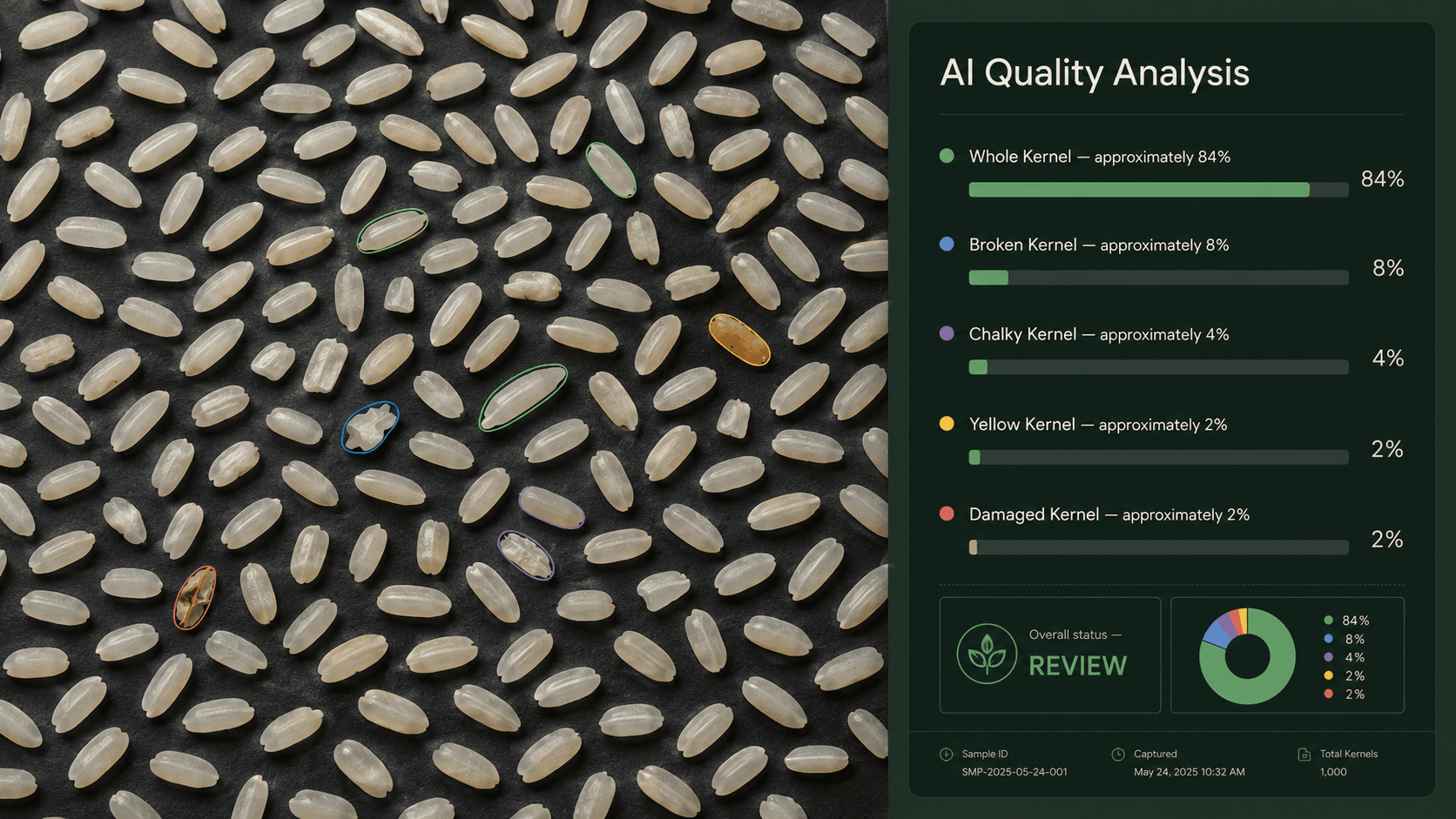
ពី រូបថត ទៅការសម្រេច
ស្វែងយល់ពីមុខងាររបស់ GrainSight និងរបៀបដំណើរការ ចាប់ពីការបង្ហោះដំបូងរហូតដល់កំណត់ត្រាត្រួតពិនិត្យដែលបានផ្ទៀងផ្ទាត់។
មុខងាររបស់វា
ការត្រួតពិនិត្យរូបភាពដោយ AI
បង្ហោះរូបភាពគំរូអង្ករ ហើយ GrainSight នឹងប៉ាន់ស្មានសូចនាករគុណភាពប្រាំ៖ អង្ករពេញគ្រាប់ បាក់ ពោះស លឿង និងខូច។
ការពិនិត្យគុណភាពរូបភាព
រូបភាពមិនសមស្រប ដូចជាគ្រាប់ជាន់គ្នា ពន្លឺមិនល្អ ឬរូបភាពព្រិល ត្រូវបានសម្គាល់ និងបដិសេធ ដើម្បីជៀសវាងការប៉ាន់ស្មានដែលមិនអាចទុកចិត្តបាន។
ការប្រៀបធៀបស្តង់ដារគុណភាព
កំណត់កម្រិតផ្ទាល់ខ្លួនសម្រាប់អង្ករពេញគ្រាប់ បាក់ ពោះស លឿង និងខូច ហើយប្រៀបធៀបរាល់ការត្រួតពិនិត្យដោយស្វ័យប្រវត្តិ។
ជាប់ / ត្រូវពិនិត្យឡើងវិញ / ធ្លាក់
រាល់ការត្រួតពិនិត្យមានការសម្រេចច្បាស់លាស់៖ ជាប់មានន័យថាបំពេញលក្ខណៈវិនិច្ឆ័យ ត្រូវពិនិត្យឡើងវិញមានន័យថាត្រូវការការពិនិត្យបន្ថែម និងធ្លាក់មានន័យថាមិនបំពេញតម្រូវការ។
ការផ្ទៀងផ្ទាត់ដោយមនុស្ស
បញ្ជាក់ ឬកែតម្រូវការប៉ាន់ស្មាន AI។ លទ្ធផល AI ដើម និងលទ្ធផលផ្ទៀងផ្ទាត់ដោយមនុស្សនៅតែបង្ហាញទាំងពីរដើម្បីធានាតម្លាភាព។
ប្រវត្តិត្រួតពិនិត្យ
រាល់ការត្រួតពិនិត្យត្រូវបានរក្សាទុក និងអាចស្វែងរកតាមគំរូ ឡូត៍ អ្នកផ្គត់ផ្គង់ កាលបរិច្ឆេទ និងលទ្ធផល ដើម្បីមិនឱ្យព័ត៌មានបាត់បង់។
របាយការណ៍
បម្លែងការត្រួតពិនិត្យទៅជារបាយការណ៍ដែលអាចចែករំលែកបាន ដោយរួមបញ្ចូលព័ត៌មានគំរូ ការប៉ាន់ស្មាន ការប្រៀបធៀប និងការសម្រេចចុងក្រោយក្នុងឯកសារមួយ។
របៀបថតគំរូបានល្អ
គួរធ្វើ
- រាយអង្ករជាស្រទាប់ស្តើងស្មើ
- ប្រើពន្លឺភ្លឺស្មើគ្នា
- ដាក់កាមេរ៉ាត្រង់ពីលើគំរូ
- ឱ្យអង្ករបំពេញផ្ទៃរូបភាពភាគច្រើន
- ធានាថារូបភាពច្បាស់
គួរជៀសវាង
- ជៀសវាងគំនរអង្ករ
- ជៀសវាងស្រមោលខ្លាំង
- ជៀសវាងរូបថតព្រិល
- ជៀសវាងកន្លែងងងឹតខ្លាំង
ត្រៀមសាកល្បងលើគំរូរបស់អ្នកហើយឬ?
ចាប់ផ្តើមជាមួយរូបភាពអង្ករ។ ទទួលការប៉ាន់ស្មានដោយ AI ក្នុងប៉ុន្មានវិនាទី។